Printable HTML Report
Overview
Printable HTML Report contains the detailed coverage information in a standalone HTML file designed for screen reading and browser printing.
It replaces the former PDF report for project sharing and review:
- It can be opened locally in a browser without a server.
- It provides an on-screen navigation menu and a printable table of contents.
- It embeds its printable style in the report file.
- It can be printed or exported to PDF from the browser when a PDF file is required.
- It uses the report title, custom logo, status colors, and filters configured in the project. The logo appears at the top of the first page on screen and in print. Subsequent printed pages have no header.
- It records the Reqchecker application version and the project version used to generate it.
Format
The format is a self-contained HTML document with internal links and print styles.
The sections are:
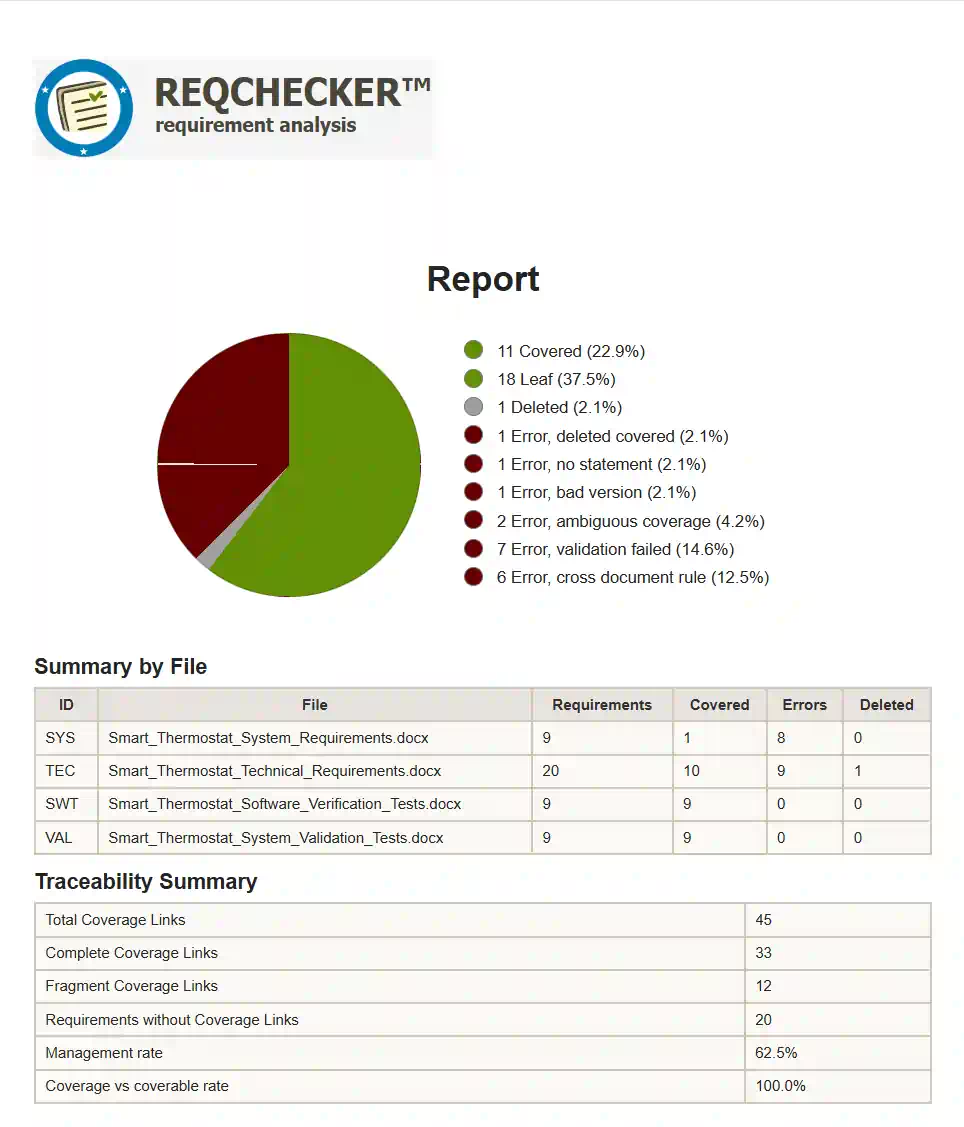
- The cover page presents the project title, logo, status chart, summary by file, and traceability summary.
- The Report Settings section presents the Reqchecker version, generation date, statement syntax, coverage link syntax, and active position filters.
- The Files section lists each analyzed input file with its ID, name, size, last modification date, and CRC32 code at read time. File IDs of up to 10 characters and CRC32 codes remain on a single line, both on screen and in print.
- The Semantic clustering section is included when semantic groups are available. It lists each group with its name, size, percentage, and neighbours.
- The Requirement List section summarizes all requirements with status, ID, version or footprint, and title. The ID is an internal link to the requirement details.
- The status sections, for example Covered, Partial, or Error, present the details of each requirement grouped by status.
- The Check Summary section lists rule errors by origin, occurrence count, description, and workaround.
Each requirement detail presents:
- Text: the extracted requirement text.
- Attributes: status, version or footprint, language, leaf flag, management rate, coverage rate, semantic group name when AI is enabled, and custom statement attributes.
- Statement(s): the source file and position where the requirement is defined, with links to the source location when available.
- Coverage Links: the source file, position, coverage status, version, child requirement, and custom coverage link attributes.
- Reference Links: direct links and child requirements, with internal navigation links inside the report.
- Checking error(s): proofreading or control errors attached to the requirement.
Usage
Use the Report menu or the -rhtml command line option to generate the report.
Select your banner in Report / Advanced settings..., using Report - Logo. PNG, SVG, GIF, JPG and JPEG files are accepted; use a width between 1000 and 1500 pixels and a width-to-height ratio of 6:1 (5% tolerance), for example 1200 × 200 pixels.
The generated file has the .html extension. Open it in a browser to review the report, use the left navigation panel to move between sections, and use the browser print command to print it or export it as PDF.
Tables contained in requirement text use the representation selected by the Table format project option. TAB preserves tabs and line breaks, RC prefixes non-empty cells with row and column coordinates, and GRID produces bordered HTML tables.