Requirement, Artifact, Coverage Link
Defines the Requirement, Artifact, Coverage Link and Reference Link concepts.
Requirement
REQUIREMENT = singular documented physical and functional need
It is used in a formal sense in systems engineering, software engineering, or enterprise engineering. It identifies a necessary attribute, capability, characteristic, or quality of a system or of a process.
For example:
- a required software feature to implement
- a required security rule to apply
- a required technical information to present in a training
Artifact
ARTIFACT = singular documented element that meet a requirement
For example:
- a software use case, software test cases, software source code, software design document etc
- a step of a process that ensures that a rule is applied
- a training slide that explains a technical information
- a new requirement that refines the parent one
Traceability link types
Traceability links have no imposed business meaning. Their meaning depends on the project context.
-
Coverage Link: the primary traceability link. Depending on the context, it can represent Satisfied By, Implemented By, Validated By, etc. It contributes to the coverage calculation of the referenced requirement. In syntax extraction mode, it is identified by the BEGIN COVER and END COVER tags, according to the coverage link syntax configuration.
-
Reference Link: a secondary traceability link between requirements, used notably for navigation and impact analysis. It does not contribute to the coverage calculation. It is identified by the LINKED tag (
#Linkedby default); see reference links.
COVERED denotes a requirement status, not a link type. A coverage link does not, by itself, mean that the requirement has the COVERED status. This status depends on the overall result of the coverage calculation.
Coverage
COVERED means that the expected coverage is complete, based on the Coverage Links declared for the requirement.
PARTIAL means that the declared Coverage Links provide only partial coverage of the requirement.
UNCOVERED means that the requirement has been explicitly managed as uncovered. LEAF identifies a valid terminal requirement for which no further coverage is required.
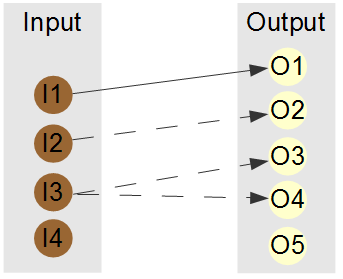
Let "input" be a set of 4 requirements : I1 to I4. Let "output" be a set of 5 artifacts : O1 to O5.
Example 1
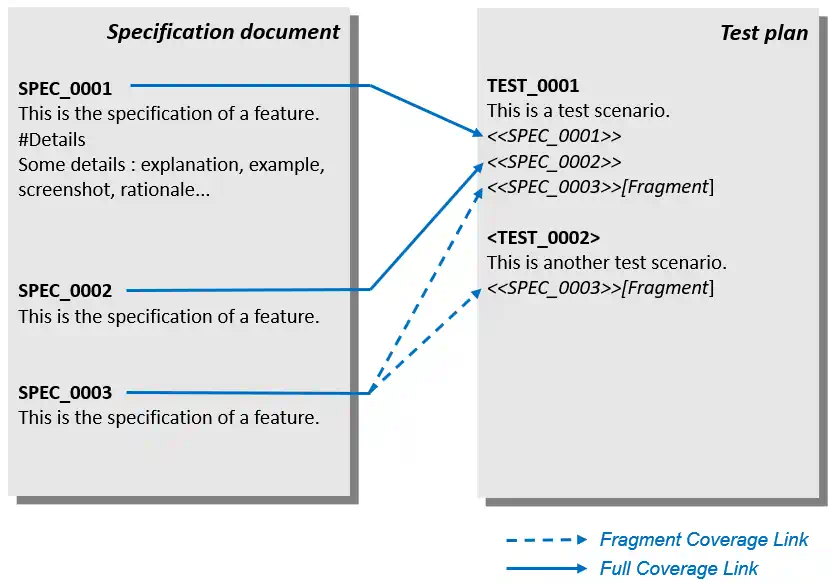
This basic example shows 3 requirements covered in 2 tests by using syntax extraction method. SPEC_0003 is fully covered by two fragment coverage links inc luded in TEST_0001 and TEXT_0002.
Example 2
The coverage links are drawn with an arrow. The fragment coverage links are drawn with a dotted arrow.
- Requirement I1 is covered by artifact O1.
- Requirement I2 is partially covered by artifact O2.
- Requirement I3 is covered by artifacts O3 and O4.
- Requirement I4 is uncovered.
The following text could be a WORD document that is equivalent to the example above.
1 Requirements

This is a text anywhere in your documentation. It can be in several documents.

1.1 Some requirements

<I1> This is the title of I1
This is the description of I1.
#EndText

<I2> This is the title of I2
This is the description of I2.
#EndText

1.2 Some other requirements

<I3> This is the title of I3
This is the description of I3.
#EndText

<I4> This is the title of I4
This is the description of I4.
#EndText

2 Artifacts
This is a text anywhere in your documentation. It can be in several documents.

2.1 Artifact O1
This is the description of artifact O1. <<I1>>

2.1 Artifact O2
This is the description of artifact O2. <<I2>> #Fragment

2.2 Artifact O3
This is the description of artifact O3. <<I3>> #Fragment

2.3 Artifact O4
This is the description of artifact. O4 <<I3>> #Fragment

2.4 Artifact O5
This is the description of artifact O5.
The requirements and artifacts can be described in one or several documents of different type: MS WORD, MS POWERPOINT, MS EXCEL, PDF etc.
Version
Each requirement has a version attribute.