Settings Dialog
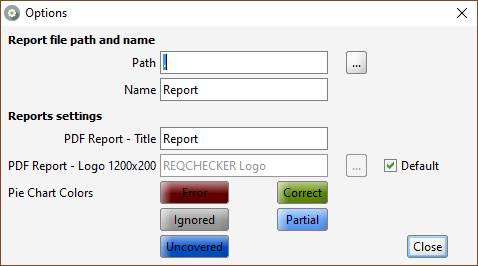
Reports file path and name
Path text field: sets the folder where the report is created
... button : browses for folder
Name text field: sets the name of the report
The following placeholders can be used for Path and Name. They are automatically solved at build time.
{date}: Variable name for the project directory. For example: "2019-12-31"{projectdir}: Variable name for the project directory. For example: "C:\Users\eltonjohn\Documents\MyProjectFolder"{projectname}: Variable name for the project name. For example: "Sample Project"{temp}: Variable name for the temporary folder. For example: "C:\Users\eltonjohn\AppData\Local\Temp"{time}: Variable name for the project directory. For example: "23-59-59"
Reports Settings
Report - Title text field: sets the name of the project in the report
Report - Logo text field: selects the banner displayed at the top of the Printable HTML Report, on the first page on screen and in print. Use a PNG, SVG, GIF, JPG or JPEG file between 1000 and 1500 pixels wide, with a width-to-height ratio of 6:1 (5% tolerance). A 1200 × 200 pixel image is recommended.
... button : browses for logo path
Default checkbox: uses default Reqchecker header. To use your own company banner, clear Default and select your image with .... The image is embedded in the generated report, so the HTML file can be shared on its own.
Use Close to validate and save the settings. The window close control or Esc discards all changes made in this dialog.
Pie Chart Colors buttons: click a button to customize the corresponding requirement status color for the project. These colors are used in coverage charts and Viewer status badges. The correct-status color also identifies correct hyperlinks in Excel reports.