Coverage Links Tab
This tab defines the syntax used to extract Coverage Links from the source documents.
GUI

Note
Blue fields use wildcards.
Orange fields use regular expression. Regular expression can be activated with the Syntax Advanced Reg. Exp. option.
The parameters described below can be modified. These parameters define how to detect a Coverage Link.
Coverage Link syntax
Syntax
[BEGIN COVER] REQUIREMENT ID [END COVER]
[BEGIN VERSION version END VERSION]
[FRAGMENT [xx%]]
[N/A [xx%]]
[UNCOVERED [xx%]]
Tip
The order of coverage link attributes has no effect and can be changed.
Attributes can be written on a single line.
Where :
- BEGIN COVER (facultative) is the coverage link beginning tag. If empty, the PREFIX is used to search for the beginning of the statement. This tag can be written in the line or cell that immediately precedes the REQUIREMENT ID.
- REQUIREMENT ID is requirement ID, syntax is deined by statement part, see Statement Definition GUI.
- END COVER (facultative) is the ending tag of a Coverage Link. If empty, the next character outside REQUIREMENT ID syntax will end the statement.
- FRAGMENT (facultative) specifies that this coverage link applies only to a sub-part of the requirement. The value accepts wild characters using
*(as with the file name in Microsoft file systems). The tag is optional, without it the coverage is registered as a full coverage. - UNCOVERED (facultative) sets that the requirement has been managed and will not be covered at the end of the analysis. Uncovered coverage tag cannot be used with FRAGMENT tag or N/A tag.
- N/A (facultative) sets that the requirement is not applicable and is ignored. It cannot be used with FRAGMENT tag or UNCOVERED tag.
- BEGIN VERSION (facultative) defines the beginning of the version associated with the coverage. The tag is optional, without it the version covered is '0' (zero).
- version (facultative) is the version of the requirement that is covered. If the version of the requirement is higher, an error will be displayed. The available characters for the version are digits
0-9, lettersa-zA-Z, dot., spaceand dash-. The comparison accepts versions like1.2or1.3.4a.
Warning
'1.9' is a lower version than '1.A' and '1.Z' is lower than '1.z'.
- END VERSION (facultative) defines end of the version associated with the Coverage Link. The tag is optional, without it the version stops at end of line or at next tag.
FRAGMENT, N/A and UNCOVERED tags can be followed by the percentage of the requirement that is concerned. See Coverage Rate, Management Rate.
Coverage Link Custom Attributes
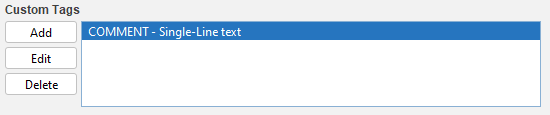
Custom Attributes can be attached to each Coverage Link.
See Custom Attributes for more details.