Introduction
REQCHECKER™ comes with two complementary softwares- SGLM License Manager and REQCHECKER™ Add-in for Microsoft Word. SGLM License Manager and REQCHECKER™ Add-in for Microsoft Word are freeware. This section presents the different REQCHECKER™ licenses.
FREE provides complete, high-quality functionality for small projects; paid editions extend scale, customization, collaboration and enterprise integration. FREE supports up to 250 distinct requirements per project, counted across all sources after declarations are grouped by identifier and project filters are applied. Above this limit, analysis stops with an explicit message, produces no reports and preserves existing reports. Results are never truncated. Paid editions have no license-based requirement count limit.
All editions support local imports, custom attributes, Web lock and the same LLM functions, including Chat, Quick Insights and Compact, subject to project AI effort and available hardware. Custom attributes and extraction filters can be added, edited and deleted in every edition. Every edition can customize controls and report presentation, and configure the semantic pair-analysis budget from 1% to 100% (default 10%). TEAM includes PRO functionality and collaborative sources; EXPERT adds extension APIs, advanced machine exchange and command-line analysis. TRIAL also enables command-line analysis.
REQCHECKER™ License types
Reqchecker exists in 5 licences types.
| Name | Time limited | Licensed to | Deployment control | Can run on virtual computer |
|---|---|---|---|---|
| REQCHECKER™ FREE | No | End user (named person) | None | Yes |
| REQCHECKER™ TRIAL | Yes | A unique hardware | Node locked | No |
| REQCHECKER™ PRO | No | A unique hardware | Node locked | No |
| REQCHECKER™ TEAM | No | The owner (named person or company) | Floating | Yes |
| REQCHECKER™ EXPERT | No | The owner (named person or company) | Node locked | Yes |
| REQCHECKER™ EXPERT Floating | No | The owner (named person or company) | Floating | Yes |
REQCHECKER™ FREE is licensed to the end user (closed to Microsoft Retail license).
REQCHECKER™ TRIAL or REQCHECKER™ PRO is licensed to a specific unique hardware (closed to Microsoft OEM license) defined by its processor and network card.
Warning
REQCHECKER™ PRO is tied to a machine for life, so it is impossible to move the license to another PC.
REQCHECKER™ TEAM, REQCHECKER™ EXPERT and REQCHECKER™ EXPERT Floating are licensed to the owner (named person or company) who purchased it.
The features provided for each licence are described on this page.
Note
REQCHECKER™ TRIAL and REQCHECKER™ PRO require a physical computer, any form of virtualization is not allowed. Other licenses are compliant with virtualization and with Microsoft Terminal Services. A node-locked EXPERT license remains bound to its licensed machine; use floating deployment when the license must move between machines.
Node-locked deployment
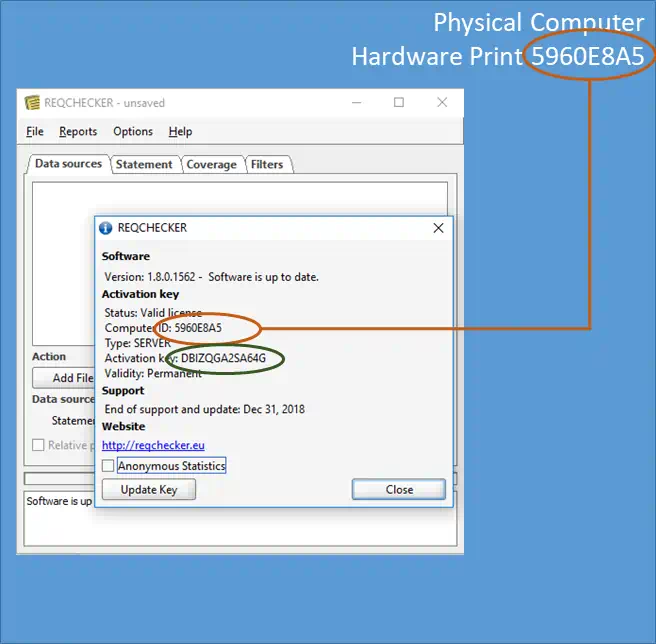
Node-locked PRO deployment requires a physical computer; node-locked EXPERT deployment also supports a virtual machine. The license activation key is linked to the hardware footprint of the licensed machine. This deployment is available for REQCHECKER™ FREE, REQCHECKER™ PRO, and REQCHECKER™ EXPERT
Floating deployment
With floating license you can empower an entire team with only the number of licenses that are expected to be in use simultaneously. Floating license is easy and cost-efficient- reduces the administration, as it is easier to administer because the IT department do not have to monitor usage as closely.
REQCHECKER™ application can be deployed on a physical computer or a virtual machine. The license activation key is the URL of the licence manager application. This deployment is available for REQCHECKER™ TEAM, REQCHECKER™ EXPERT Floating.
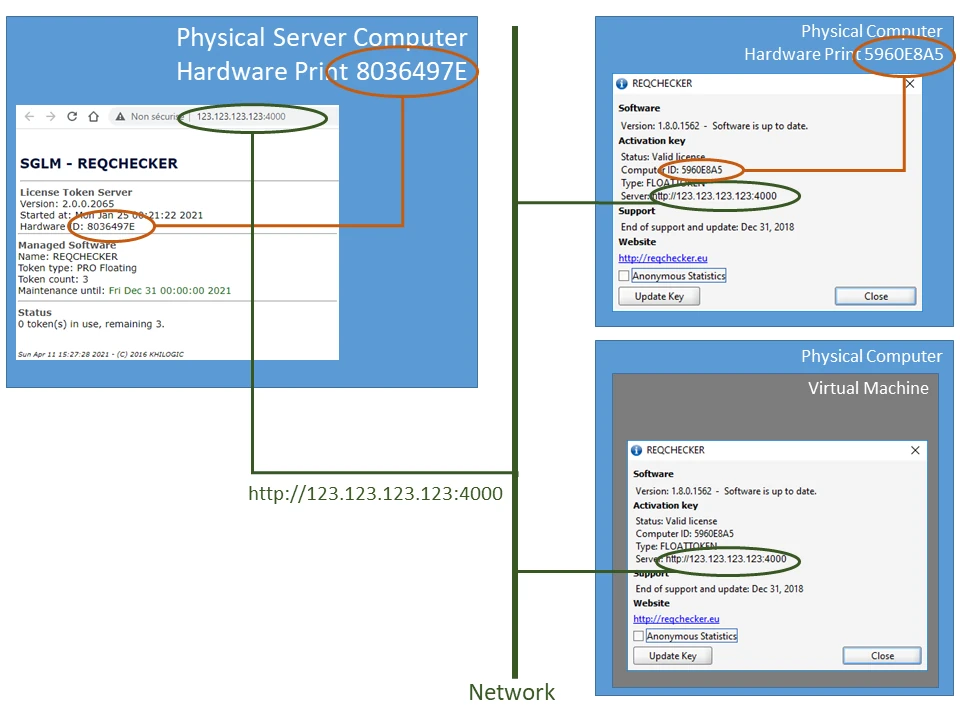
In this mode the first user to open REQCHECKER™ gets the first free token. The token is released when the user closes REQCHECKER™ after 15 minutes. This delay prevents a user from losing the token while still working with it and simply opening and closing projects.
Floating deployment hosted by KHILOGIC EI
If you are using a floating token server hosted by KHILOGIC EI (REQCHECKER™ TEAM SaaS license or REQCHECKER™ TEAM + Floating License Hosting option) your REQCHECKER™ application connects to the token server with the following information:
- URL :
http://sglm.reqchecker.eu/<company>/<sub path> - Protocol :
HTTP - Port :
80 - Method :
POST - User agent :
Mozilla/5.0 (Windows NT 10.0; Win64; x64) AppleWebKit/537.36 (KHTML, like Gecko) Chrome/75.0.3770.100 Safari/537.36